Double Tax Avoidance Agreement (DTAA) Between India and Australia
Read More
_1772100536642.webp&w=3840&q=75)
Under the advance tax mechanism, income tax is paid in advance, in multiple installments throughout the financial year, rather than a lump-sum payment after the year-end. To make advance tax payments, the taxpayer estimates their tax liability at the beginning of the financial year. Once the tax liability is estimated through accurate calculation, the advance tax payments are made in a fixed percentage and paid in four installments on the due dates set by the ITD.
In this blog post, we will explore how taxpayers can make advance tax payments online using a simple, step-by-step process.
Advance tax is a concept under which a taxpayer pays their financial year taxes in advance, in installments, rather than making a single lump-sum payment at the end of the year when filing the ITR. It is a convenient way for self-employed professionals, individuals, and businesses to pre-pay their estimated income tax liability to the Government of India well in advance.
This way, government revenue collection is quite smooth, and it also prevents taxpayers from facing a hefty tax burden at the end of the year. In fact, the Income Tax Act 1961 also requires most taxpayers to make a proactive estimate of their total income for the year, including the tax deducted/deductible/collected/collectible for the year, and then pay their taxes well in advance on the due dates in the fiscal year itself.
The advance tax is applicable in every case where the total tax liability after considering the relevant TDS and TCS exceeds Rs 10,000. However, senior citizens aged 60 years or above who have no income from any profession or business are not required to pay advance tax.
The advance tax payment due dates are as follows:
| Due Date | Advance Tax Installment |
|---|---|
| By June 15 | 15% of the tax liability |
| By September 15 | 45% of the tax liability |
| By December 15 | 75% of the tax liability |
| By March 15 | 100% of the tax liability |
Now, please ensure that the quarterly advance tax payment due dates do not apply to the taxpayer who declares their gains and profits according to the presumptive taxation scheme. Such taxpayers must pay the entire tax liability amount in a single installment on or before March 15.
Additionally, taxpayers must note that any tax paid up to March 31 will be treated as an advance tax payment.
To calculate your advance tax, you have to estimate your total income for the financial year and then compute the total tax liability based on the applicable tax rate.
The following is a general step-by-step process for calculating advance tax.
Estimate the Income Sources: Determine all the sources of income you are expecting to earn during the financial year. This can be your business income, salary, rental income, capital gains, interest income, and so on.
Calculate Your Total Income: Sum up your estimated income from the sources you have identified to come to a conclusion of your estimated total income for the financial year.
Deduct Allowable Deductions & Past Losses: From the estimated tax liability, deduct any applicable deductions such as health insurance premiums, life insurance premiums, PPF, investments, etc. Furthermore, you may also need to set off past year's losses that are eligible to be set off.
Here's a thing: if you opt for the new tax regime, certain deductions aren't allowed. So, while deducting the eligible deductions from your estimated income, keep your regime in mind, and after this step, you will have your estimated taxable income.
Apply the Tax Slabs: To your estimated taxable income, apply the applicable income tax slab and rates for the financial year. Please ensure that the tax rates might vary from year to year. Additionally, the tax slabs for the old and new tax regimes differ, so be precise and mindful when applying the slabs.
Apply Surcharge and Cess: Apply any surcharge or health and education cess if applicable to your calculated tax amount.
Deduct TDS and TCS: If applicable, deduct the tax collected at source and tax deducted at source, and subtract that amount from your estimated tax liability.
Determine Advance Tax Liability: To determine your advance tax liability, understand that it is the difference between your calculated tax liability and any TDS that has already been deducted.
Divide into Installments: If your advance tax liability exceeds the threshold of Rs 10,000, divide it into 4 installments and make the payments as per the due dates mentioned in the table above.
Payment of Advance Tax: Lastly, pay the calculated advance tax amount on or before the specified due dates. You can either pay the taxes online through the official Income Tax Department website or at your designated bank. For NRIs, it is advised to pay the taxes online at their convenience.
If there are any changes in the estimated tax liability during the year, then you have the right to revise the advance tax amount in the remaining installments and pay the tax as per the revised tax liability estimate.
NRIs and Indian residents, please note that advance tax calculations are complex and require in-depth tax knowledge, along with an understanding of your personal and business financials. It gets more complex when the taxpayers have multiple income sources, deductions, and so on. Henceforth, to stay compliant, it is advised to consult a tax professional or use a trusted online income tax calculator tool to ensure your calculations are accurate.
Savetaxs help you file your NRI taxes fast, accurately, and stress-free.
The following are the benefits of advance tax payments provided.
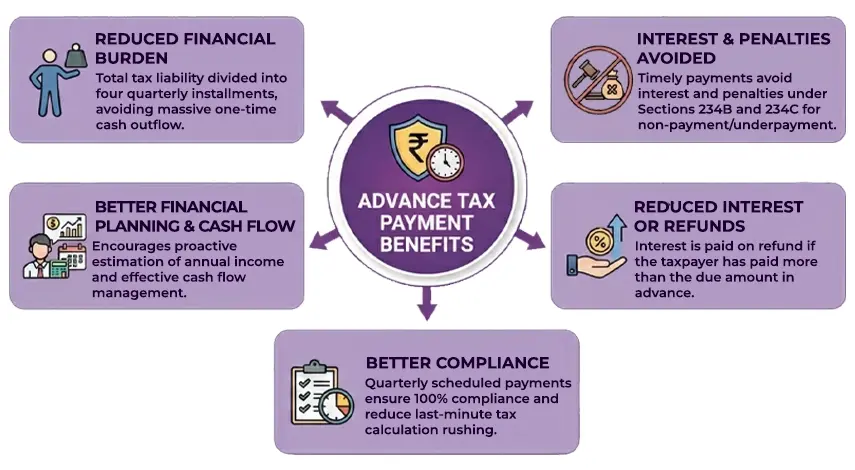
Reduced Financial Burden: When your total tax liability is divided into four quarterly installments, it reduces you from a massive one-time cash outflow phase at the end of the fiscal year.
Interest and Penalties Are Avoided: Paying your advance tax on time avoids interest and penalties under Sections 234B and 234C. Penalties under this section apply for non-payment or underpayment of tax.
Better Financial Planning & Cash Flow: Advance tax payments encourage taxpayers to proactively estimate their annual income, manage cash flow more effectively, and budget for upcoming tax payments.
Reduced Interest or Refunds: While paying advance tax installments, if the taxpayer has paid more than the due amount, they will receive interest on the refund.
Better Compliance: With advance tax payments, tax payments are scheduled quarterly, ensuring 100% compliance and reducing the need for last-minute rushing to calculate taxes.
Failure to make timely and accurate advance tax payments will result in interest being charged under Sections 243 and 234C of the Income Tax Act.
Furthermore, failure to pay the advance tax or an incorrect estimate of the advance tax liability will result in a notice from the Income Tax Department, and non-payment will incur heavy interest and penalties.
There are two ways to pay your advance tax.
Add images at every step
Step 1: Go to the e-filing portal "www.incometax.gov.in". Under the "Quick Links" section, select "e-Pay Tax".
Step 2: Enter your PAN details, complete OTP verification using your mobile number, and click "Continue".
Step 3: Once the OTP verification is done, a success message with your PAN and masked name will be displayed. Click on "Continue" to proceed.
Step 4: Click on "Proceed" under the "Income Tax" window.
Step 5: Now select the relevant assessment year and the payment type "Minor Head" as "advance tax (200)", then click "Continue".
Step 6: Enter all tax payment details accurately under the applicable categories, then click "Continue".
Step 7: In the payment mode selection page, pick the eligible payment mode that is net banking/debit card/payment gateway, and so on. Once the payment mode is selected, click on continue.
Step 8: Preview and verify all the filed details once again, and then click on "Pay Now" to make the tax payment. In case of any errors, edit the details and then verify the details and then pay
Step 9: Tick the checkbox after reviewing the terms and conditions, then click "Submit to Bank" to continue with the payment. Now, based on the payment you selected, you will be redirected to the appropriate webpage to complete the payment.
Step 10: Once the payment is done, the Challan Form (CRN) will be generated successfully. For your future records and to complete the ITR filing process, download the challan form.
Taxpayers can also make tax payments by logging in to their income tax portals, following the given steps.
Step 1: Go to the income tax e-filing portal of the Income Tax and e-Department website and click on "Login" and then enter your login credentials.
Step 2: On the dashboard, under "e-file," select the "e-pay tax" options.
Step 3: On the "e-pay tax" page, click on the "New Payment" Option and click on the "Online tax payment".
Step 4: On the new payment page, click on "Proceed" under the "Income Tax" window.
Step 5: Please follow steps 5 to 10 as mentioned under Option A to complete the entire tax payment online.
Please note that you will receive a confirmation of successful payment on your registered email ID and an SMS on your mobile number registered under the e-filing portal.
Savetaxs offer end to end expert NRI income tax consultation.
Paying advance tax online is a crucial aspect of the Indian taxation system. This concept helps businesses, self-employed individuals, and individuals to distribute their tax liabilities across the financial year, optimizing time and compliance by reducing end-of-year burdens and aiding timely government cash flow.
As an NRI, if you are seeking professional assistance to consult you on advance tax filing and payment in India, Savetaxs is the name to trust. Our experts provide end-to-end consultation on due dates. advance tax calculation methods, payment options, and will ensure seamless tax management all throughout. Furthermore, the experts will ensure there are no delays or underpayments of taxes and will ensure estimated income tax is paid on time.
Connect with us as we serve our clients 24/7 across all time zones.
Note: This guide is for information purposes only. The views expressed in this guide are personal and do not constitute the views of Savetaxs. Savetaxs or the author will not be responsible for any direct or indirect loss incurred by the reader for taking any decision based on the information or the contents. It is advisable to consult either a CA, CS, CPA or a professional tax expert from the Savetaxs team, as they are familiar with the current regulations and help you make accurate decisions and maintain accuracy throughout the whole process.

Mr Shaw brings 8 years of experience in auditing and taxation. He has a deep understanding of disciplinary regulations and delivers comprehensive auditing services to businesses and individuals. From financial auditing to tax planning, risk assessment, and financial reporting. Mr Shaw's expertise is impeccable.
Want to read more? Explore Blogs