NRI Banking Services

SBI KYC Update - How To Update KYC In SBI Online?

  • April 2, 2026
  • 12 mins
  • 11.7K Views
SBI KYC Update

SBI KYC online update allows the bank account holder to complete their Know Your Customer process online without visiting the bank. There are two ways for customers to update their SBI KYC: online and offline. Knowing how to update the KYC in SBI ensures compliance with RBI guidelines, helps in uninterrupted banking services, and prevents account freezing.

Want to know more about the SBI KYC update? Read the blog and gather all the information.

Key Takeaways
  • SBI allows customers to update their KYC details online through Net Banking, visiting a branch, or the YONO App.
  • With just a few steps, users can update personal information like address, income information, Aadhaar, and more.
  • SBI KYC update requires vital documents like PAN card, Aadhaar card, address proof, and more.
  • To prevent your bank account from freezing, it is vital to update your KYC. It ensures protection from fraud, avoids penalties, and enables smooth banking.
  • Online SBI KYC updates generally process within 1-2 business days.
Key Highlights
  • Application Mode: You can update KYC through Net banking, YONO app, or offline by filling out the KYC form.
  • Documents Required: Passport, Aadhaar card, Voter ID, NREGA card, or NPR letter.
  • Coverage: The SBI KYC update applies to all bank accounts linked to a Customer Information File (CIF).
  • Users: There are separate KYC rules for individuals, minors, and NRI account holders.
  • Importance: As per RBI rules, non-compliance with KYC norms results in account freezing.

How to Update SBI KYC Online?

SBI KYC update online is the process of updating and verifying customer identity and address details with the bank to comply with RBI guidelines. Through internet banking, the YONO app, email, or post, NRIs can simply update SBI KYC from abroad. Periodic updates ensure the account security and uninterrupted transactions.

Moving ahead, let's look at the different ways by which you can update SBI KYC.

How to Update SBI KYC through Internet Banking?

Here are the simple steps through which you can update SBI KYC through internet banking:

  • Step1: Visit the official website of the State Bank of India.
  • Step 2: To access the internet banking portal, mention your MPIN User ID and password.
  • Step 3: Once you log in to the portal, go to the "My Accounts and Profile" option.
  • Step 4: Click on the "Update KYC" icon.
  • Step 5: Mention your email address correctly.
  • Step 6: Check your Aadhaar card number, PAN number, income parameters, and other details (if needed).
  • Step 7: Click on the checkbox consits of a declaration.
  • Step 8: To update, click on the "submit" option.
Best NRI Banking Services in India

Connect with Savetaxs, and get the best NRI banking services as per your financial and investment goals from the experts.

How to Update SBI KYC through YONO?

Yono App is the integrated digital banking platform of SBI that provides convenient financial services to SBI account holders. These are the following steps that you need to follow to update SBI KYC through the Yono App:

  • Step 1: Open the SBI YONO App and use your MPIN to log in to the portal.
  • Step 2: On the top left of the home screen, click on the menu and select "Service Request."
  • Step 3: Choose the "Update KYC" option.
  • Step 4: Mention your profile password and click on the "Submit" option.
  • Step 5: Enter the information that you want to be updated, upload the relevant documents for it, and submit.
  • Step 6: On your registered mobile number, you will get an OTP. Mention the OTP and click on the "Submit" option.
  • Step 7: If you have been successful in updating your KYC, you will get a message saying, "Successful KYC for CIF in bank records has been updated through YONO."

Email or Post (for NRIs/ Outstation Customers)

If online methods are not available, NRIs can update their SBI KYC via email or postal submission. For this, they need to send:

  • Duly signed KYC update form
  • Overseas address proof
  • Self-attested passport copy
  • Visa/ residence permit
  • PAN card copy

You can email these documents to your SBI home branch or send them by courier or post. Additionally, some SBI branches may ask for documents attestation by the Indian embassy, a bank overseas, or a notary. For NRIs, who do not have interest banking or access to the YONO app, this option is the best for KYC update.

Further, this is how individuals can do an SBI KYC update online. Generally, like residents, the SBI KYC update process for NRI customers remains the same. Now, moving ahead, let's know how to download the SBI KYC form.

How to Download the SBI KYC Form?

Here is how you can download the SBI KYC form through the State Bank of India by following the steps mentioned below:
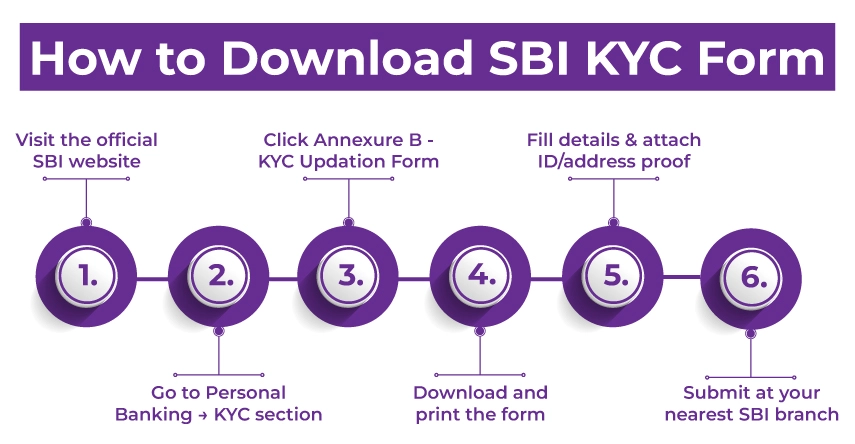
Download SBI KYC Form

  • Step 1: Go to the official SBI website.
  • Step 2: Under personal banking, scroll down to the KYC section.
  • Step 3: Now, click on the Annexure B- KYC updation form for individuals.
  • Step 4: On your device, download the PDF form.
  • Step 5: Print the form and, in block letters, fill in your correct details.
  • Step 6: Along with the form, attach the copies of your ID and address proof documents like Aadhaar, voter ID, passport, driving license, National Population Register letter, or NREGA card.
  • Step 7: Once you done all these things, submit the completed form with documents at your nearest SBI branch.

This is how you can download the SBI KYC form. Now, moving further, let's know about the SBI KYC Form PDF download.

SBI KYC Form PDF Download

You can simply download the SBI KYC Form PDF by visiting the official State Bank of India website. Considering this, visit the website, fill out the KYC update form, fill in the details, and submit it at your nearest SBI branch.

This is how you can download the SBI KYC form PDF. Moving ahead, let's know what an SBI KYC form looks like.

SBI KYC Form Sample

The picture given below showcases what an SBI KYC updation form looks like:

Now, moving further, let's know the documents required for KYC in SBI bank by an NRI.

Which Documents Are Required for KYC in SBI Bank?

Depending on your circumstances, the KYC verification documents vary. Considering this, it includes the following things:

  • Identity Proof for Individuals
    • PAN Card
    • Aadhaar Card
    • Driving License
    • Voter ID card
    • A letter issued by the National Population Register containing details of the address and name
    • A job card issued by the National Rural Employment Guarantee Act (NREGA), along with the signature of a state government official.
  • Address Proof for Individuals
    • Passport
    • Credit Card Statement (not older than 3 months)
    • Salary Slip
    • Landline Telephone Bill (not older than 3 months)
    • Income/ wealth tax assessment order
    • Bank account statement
    • Electricity bill (not more than 6 months old)
    • Letter from a recognised public authority
    • Letter from a reputed employer
    • Ration card
  • Documents Required for NRIs
    • Passport and residence visa copies, attested by:
      • Foreign offices
      • Indian embassy
      • Notary public
      • Officers of correspondent banks whose signatures can be checked through an authorised branch (A/ B category Forex handling branch)
  • Documents Required for Minors
    • If the minor is under 10 years of age, you need to submit the ID proof of the person who is operating the account.

These were the list of documents required during the SBI KYC update procedure. Moving ahead, let's know why it is important to update KYC information with SBI.

Increase Your NRI Tax Refund in FY 2026

Plan your taxes early with Savetaxs expert for compliant tax savings in India and file them on time with complete accuracy.

Schedule A Call Today

Why is it Important to Update KYC Information with SBI?

Here is the list of reasons why it is important to update the KYC information with SBI:

  • If your bank documents are not up-to-date, SBI may freeze your bank account, whether a resident or an NRI bank account. Additionally, you will not be able to make any transactions from your bank account.
  • Accurate Know Your Customer (KYC) information assists you in identifying and helps prevent fraudulent activity on your bank account.
  • KYC updation can save you from account restrictions and potential penalties.
  • An updated KYC certifies smooth financial transactions like fund transfers, seamless loan approvals, and other financial activities.

So, because of the mentioned, you need to update your KYC information with SBI.

Final Thoughts

Lastly, the SBI KYC update is vital for smooth financial transactions. Additionally, the SBI NRI account KYC update also helps NRIs from potential restrictions. Therefore, residents and NRIs should timely update their KYC with documents such as photos, PAN, OVDs, and more. There are several ways by which they can do so, such as net banking or the YONO app.

Furthermore, knowing how to update KYC in SBI certifies continued access without account restrictions to all banking services. If you are still confused about the process, connect with Savetaxs. We have a team of banking and financial experts who assist you in updating your documents and planning your taxes in India.

Note: This guide is for information purposes only. The views expressed in this guide are personal and do not constitute the views of Savetaxs. Savetaxs or the author will not be responsible for any direct or indirect loss incurred by the reader for taking any decision based on the information or the contents. It is advisable to consult either a CA, CS, CPA or a professional tax expert from the Savetaxs team, as they are familiar with the current regulations and help you make accurate decisions and maintain accuracy throughout the whole process.

Manish Prajapat
Manish Prajapat(Tax Expert)

Mr Manish is a financial professional with over 10 years of experience in strategic financial planning, performance analysis, and compliance across different sectors, including Agriculture, Pharma, Manufacturing, & Oil and Gas. Mr Prajapati has a knack for managing financial accounts, driving business growth by optimizing cost efficiency and regulatory compliance. Additionally, he has expertise in developing financial models, preparing detailed cash flow statements, and closing the balance sheets.

Recent Post

Want to read more? Explore Blogs

Frequently Asked Questions

Yes, you can update your KYC without visiting a branch of State Bank of India. You can complete the update through internet banking or the YONO mobile application, subject to eligibility and document requirements.

Yes, updating KYC online is safe if done through official channels such as the bank’s official website or the YONO app. Customers should avoid clicking on suspicious links received via SMS or WhatsApp, as fraudsters may send fake messages or malicious files to steal banking credentials.

You can complete your SBI KYC online from home using internet banking or the YONO app. If there are no changes in your existing KYC details, you may also be able to confirm your KYC through ATM or authorized digital channels, as permitted by the bank.

You can initiate the KYC confirmation process by sending “Hi” to the bank’s official WhatsApp number (9022690226) from your registered mobile number. This option is generally available only when there are no changes in your KYC details. The process typically involves verifying information, following prompts, and confirming via OTP.